Mouse Charging Docks for Logitech & Razer | EnergyFort
Choose mouse charging docks by the exact mouse model and charging connection. EnergyFort offers RGB bottom-contact docks, front-port magnetic wired docks and stationary Qi kits for selected Logitech and Razer mice. Compatibility with one system does not establish compatibility with another.
Mouse Charging Docks: Compare the Three Charging Setups
| Option | Setup and included parts | Before ordering |
|---|---|---|
| RGB Mouse Dock | Listed compatible Logitech models: remove the original bottom cover and park directly on the dock; no extra conversion module. Includes dock, USB cable and manual. | Check the exact model list; Logitech installation does not apply to every Razer mouse. |
| Magnetic Wired Dock | Selected magnetic tip connects through the front USB-C or Micro-USB port. Tip and charging cables included. | Match connector, listed model and port clearance. Magnetic does not mean wireless. |
| Logitech Qi Kit | Install the supplied replacement bottom module. Kit includes module, Qi pad and USB cable. | For listed Logitech models; parked charging, not POWERPLAY charging while moving. |
Find the Dock Listed for Your Mouse
For MX Master 3S, G PRO X SUPERLIGHT, SUPERLIGHT 2 and Razer Viper V3 Pro, start with our mouse charging dock compatibility guide. Compare listed models, installation steps and connector options before choosing. A USB-C port alone does not establish fit.
Check Your Model and Charging Routine
For Logitech G PRO X3 SUPERSTRIKE, check each individual EnergyFort product's current model list. Front-port magnetic charging requires the USB-C tip; RGB and Qi use their own bottom-charging installation methods.
For compatible Logitech RGB/Qi setups, check charging in G HUB rather than relying on the mouse LED. Charging may pause around 85%, depending on the mouse and conditions. Front-port magnetic wired charging uses a different connection and can reach 100% on supported models. Mouse and USB wall charger are not included.
Full charging comparison · SUPERLIGHT generations · G502 X Plus / LIGHTSPEED · Basilisk charging systems
A dock is optional if your existing cable meets your needs. Check the selected product's current model and package list before ordering.


Mouse Charging Solutions
Find the Right Mouse Charging Solution
Not every wireless mouse charges the same way. Some users prefer an upright mouse charging dock for desktop storage and RGB lighting, while others need a magnetic charging dock for easier daily charging or a Qi wireless charging module for selected Logitech gaming mice.
EnergyFort offers different mouse charging solutions for compatible Logitech and Razer wireless mice, helping users reduce cable clutter, keep receivers organized, and keep their gaming or work setup ready for daily use.
Before choosing a product, please confirm your exact mouse model, charging port type, charging contact position, and whether your mouse is listed as compatible on the product page.
Check whether your Logitech or Razer wireless mouse is listed as compatible.
Select upright dock, magnetic dock, or Qi wireless charging module.
Pick the solution that best fits your gaming desk, work desk, or daily use.
Three Ways to Charge Your Wireless Mouse
-

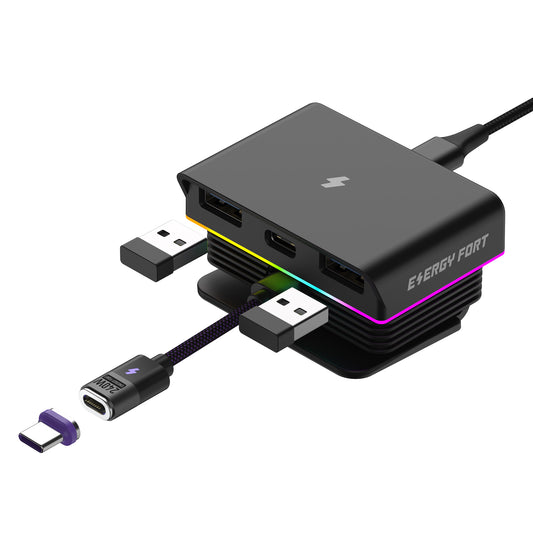
Mouse Charging Dock
Learn MoreStand your mouse upright while charging.
RGB lighting
Receiver storage
Dual USB hub
Ideal for gaming desks -

Magnetic Charging Dock
Learn MoreMagnetic quick-connect charging.
USB-C / Micro USB
Less port wear
Compact desktop setup
Fast daily charging -

Wireless Charging Module
Learn MoreQi wireless charging.
No daily cable plugging
Designed for Logitech gaming mice
Cleaner desktop
Minimal charging setup


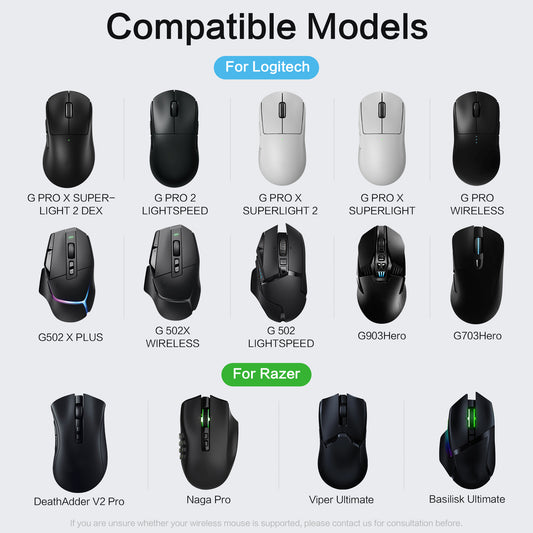
Compatible Logitech Gaming Mice
• G PRO X Superlight
• G PRO X Superlight 2
• G PRO X Superlight 2C
• G PRO X Superlight 2 DEX
• G PRO Wireless
• G PRO 2 Lightspeed
• G502 Lightspeed
• G502 X Lightspeed
• G502 X Wireless
• G502 X Plus
• G703
• G903
Compatible Razer Gaming Mice
• Basilisk Ultimate
• Viper Ultimate
• Viper V3 Pro
• DeathAdder V2 Pro
• Naga Pro
Which Charging Solution Should I Choose?
Mouse Charging Dock
✔ RGB Gaming Setup
✔ Built-in USB Hub
✔ Receiver Storage
Magnetic Charging Dock
✔ Fast Daily Charging
✔ Less Port Wear
✔ USB-C / Micro USB
Wireless Charging Module Best for:
✔ Qi wireless charging
✔ Compatible Logitech mice
✔ Minimal desktop setup
Before You Buy
Before placing your order,
please check:
✔ Mouse model
✔ Charging interface
✔ Charging contacts
✔ Product compatibility
✔ Product version
Why Choose EnergyFort Mouse Charging?
BUYING QUESTIONS
Frequently Asked Questions
Do these charging docks work with all wireless mice?
No. EnergyFort mouse charging products are not universal. Please check your mouse model and charging method before ordering.
Which product should I choose?
Choose the Mouse Charging Dock for selected Logitech and Razer mice with bottom charging contacts.
Choose the Magnetic Charging Dock if your mouse uses a USB-C or Micro USB charging port.
Choose the Wireless Charging Module only for compatible Logitech mice that support Qi wireless charging after replacing the bottom module cover.
Can I use it while gaming?
The dock is mainly designed for charging between gaming or work sessions. Place the mouse on the dock when charging is needed.
What should I check before ordering?
Please confirm your exact mouse model, charging port type, charging contact position, and the compatible model list on the product page.
Does the wireless charging module support Logitech POWERPLAY?
No. The EnergyFort wireless charging module works with standard Qi wireless charging pads. It does not support Logitech POWERPLAY.
ENERGYFORT GUIDE
Learn More About Mouse Charging
Not sure which charging solution is right for your mouse?
The complete guide explains the difference between contact charging, magnetic dock charging, and Qi wireless charging module replacement.
-
-
-

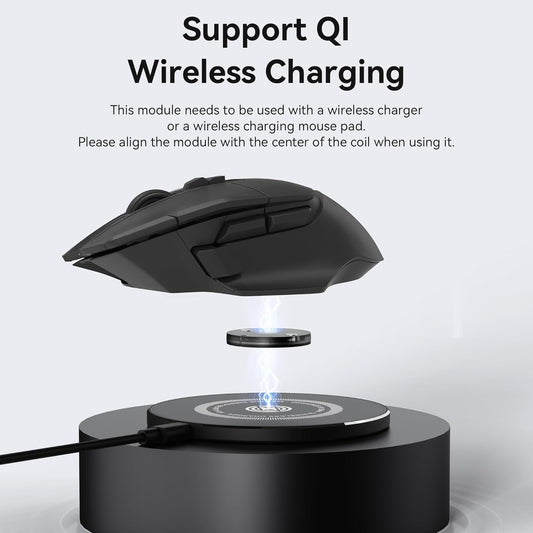
EnergyFort Qi Mouse Charging Kit for Logitech — Module & Pad
From $28.99 USD -