EnergyFort Qi Mouse Charging Kit for Logitech — Module & Pad
Couldn't load pickup availability
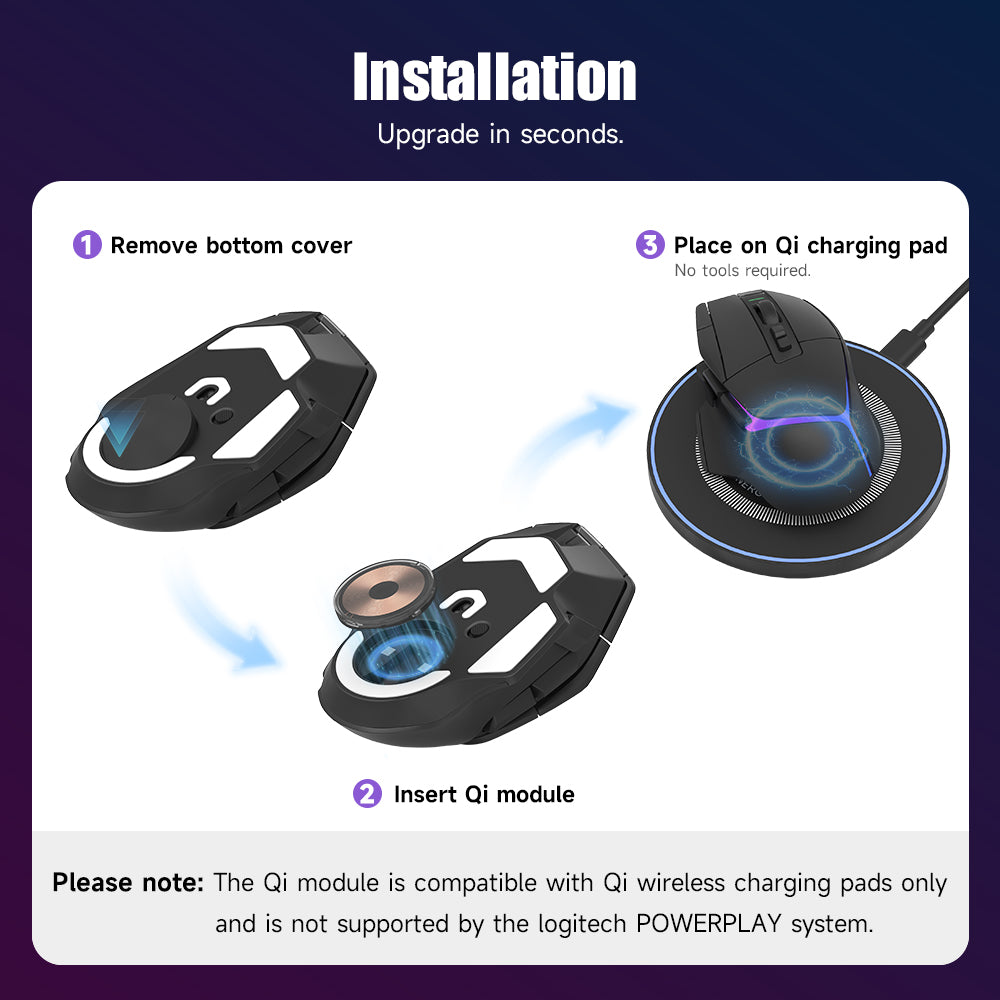
A stationary Qi charging kit for listed compatible Logitech mice, with a replacement bottom module, charging pad and USB cable included. Install the supplied module, then park the mouse on the pad. Check your exact model before ordering.
This is not a POWERPLAY mouse pad and does not provide continuous charging across a gaming surface. Charging may pause around 85% depending on the Logitech model and conditions. Mouse and wall charger are not included.
Compare the Qi kit with RGB and front-port magnetic charging.
New compatibility: EnergyFort lists this Qi wireless mouse charging kit as compatible with the Logitech G PRO X3 SUPERSTRIKE. Install the compatible replacement charging module, then place the mouse on the included Qi pad whenever you want to top up power.
Best for: Logitech users who want to charge by placing the mouse on a pad instead of plugging a cable directly into the mouse.
Compatible Logitech Mouse Models
- Logitech G PRO X3 SUPERSTRIKE
- G PRO X Superlight 2
- G PRO X Superlight 2C
- G PRO X Superlight 2 DEX
- G PRO X Superlight
- G PRO X2 SUPERSTRIKE
- G PRO Wireless
- G PRO 2 Lightspeed
- G502 Lightspeed
- G502 X Lightspeed
- G502 X Wireless
- G502 X Plus
- G703 Lightspeed / G703 Hero
- G903 Lightspeed / G903 Hero
This product is not compatible with Logitech POWERPLAY mouse pads or POWERPLAY charging systems.
How It Works
- Remove the original bottom module from your compatible Logitech mouse.
- Install the EnergyFort charging module.
- Connect the included Qi charging pad with the USB-A to USB-C cable.
- Place the mouse on the center of the charging area.
Key Features
- Qi wireless charging: place the compatible mouse on the pad to charge.
- 10W wireless charging support.
- Replacement charging module: fits into the compatible mouse base.
- Less cable plugging: useful for cleaner gaming and work setups.
- Available in Transparent Black and Thunder.
Check Charging in G HUB, Not Only the Mouse LED
For listed compatible Logitech mice, the mouse charging indicator can remain dark during bottom charging. Open Logitech G HUB to check the battery level and charging status; the LED alone is not a charging test. If the battery is low and does not increase, confirm module seating, pad alignment and USB power, then compare direct cable charging before replacing hardware.
Logitech Wireless Charging and Battery Protection
According to EnergyFort's reported experience with compatible Logitech mice, wireless charging may pause at around 85% as part of the mouse's battery-protection behavior. The exact stopping level varies by mouse model, battery condition and firmware; around 85% is an approximate level, not a guaranteed fixed cutoff. Charging stopping below 100% does not by itself mean the charger is faulty. Check the charging status and battery level in Logitech G HUB.
Before You Buy
Confirm your exact mouse model before ordering. Charging performance can vary with alignment, USB power source, software and use environment. Mouse and wall charger are not included.
What’s in the Box
- Wireless Mouse Charging Module × 1
- Qi Wireless Charging Pad × 1
- USB-A to USB-C Cable × 1
FAQ
Does the Qi charging kit support Logitech G PRO X3 SUPERSTRIKE?
EnergyFort lists the Logitech G PRO X3 SUPERSTRIKE as compatible. After installing the compatible replacement charging module, place the mouse on the Qi pad to recharge.
Is this the same as POWERPLAY?
No. It uses standard Qi wireless charging and is not compatible with Logitech POWERPLAY systems.
How do I know whether my mouse fits?
Check the compatible model list above. You can also read the Logitech Mouse Charging Guide.
Buying Questions: Qi Charging vs POWERPLAY
Can my stock Logitech mouse charge on a Qi phone charger without a replacement module?
This EnergyFort kit requires installation of the supplied replacement bottom charging module in a listed compatible Logitech mouse. Do not assume the mouse's original bottom cover or a POWERPLAY module provides Qi compatibility. This package includes one charging module, one Qi pad and one USB-A to USB-C cable; the mouse and wall charger are not included.
Can this Qi kit charge my mouse while I move it during gaming?
The intended setup is to park the compatible mouse on the center of the charging area to recharge. It is not a POWERPLAY charging mouse pad and is not compatible with Logitech POWERPLAY systems. Choose it for charging during breaks or when the mouse is idle, rather than continuous charging across a gaming surface.
Does 10W wireless charging support mean my mouse charges at 10W?
No specific mouse charging rate or full-charge time is promised by the 10W wireless charging support specification. Charging performance depends on the mouse, module, alignment and USB power source. Do not interpret the charging setup's rating as a guaranteed 10W delivered to the mouse battery.
Share