EnergyFort Gaming Desk Setup Kit – Magnetic Mouse Dock + 8KHz Aviator Keyboard Cable
No se pudo cargar la disponibilidad de retiro
- Free Shipping
- 30-Day Returns
- 12-Month Warranty
EnergyFort Gaming Desk Setup Kit
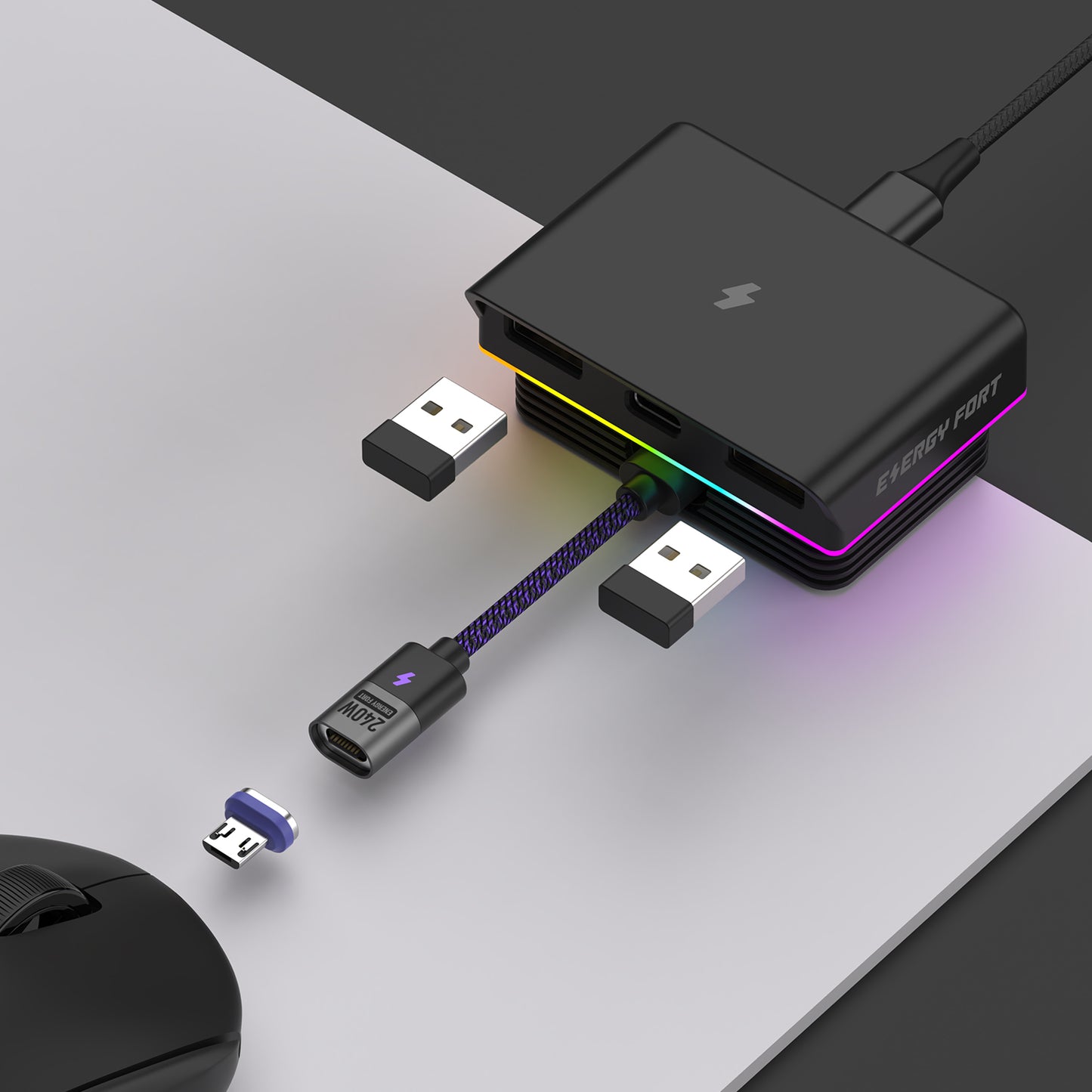
A two-piece gaming desk accessory bundle: one EnergyFort Magnetic Mouse Charging Dock with your choice of USB-C or Micro-USB magnetic tip, plus one EnergyFort 8KHz Coiled Aviator Keyboard Cable. Choose the magnetic tip type and keyboard cable color separately. The keyboard cable included in this bundle is the Without Weighted Bar configuration.
What Problem Does This Kit Solve?
A gaming desk can become cluttered when a wireless mouse needs a charging cable and a mechanical keyboard uses a long, loose connection cable. This kit pairs a magnetic charging connection for a selected compatible mouse with a coiled aviator keyboard cable, helping keep two everyday desk connections organized in one coordinated setup.
What's Included
- 1 × EnergyFort Magnetic Mouse Charging Dock — choose USB-C Magnetic Tip or Micro-USB Magnetic Tip.
- 1 × EnergyFort 8KHz Coiled Aviator Keyboard Cable — choose Black, White or Pink-Blue Mix; Without Weighted Bar configuration only.
- Mouse dock accessories: selected magnetic tip, short magnetic charging cable, USB-A to USB-C cable, magnetic tip ejection tab and user manual.
The mouse, keyboard, computer, wireless receiver and optional weighted guide bar shown in product images are not included. The keyboard cable in this bundle does not include the weighted guide bar.
Why Choose the EnergyFort Gaming Desk Setup Kit?
- Convenient magnetic mouse charging: connect a selected compatible mouse through the matching magnetic tip instead of repeatedly plugging a cable directly into the mouse.
- Two magnetic tip options: choose USB-C or Micro-USB to match the charging port of your supported mouse model.
- Desktop connectivity: the dock includes two USB 2.0 ports and front receiver placement for your own compatible wireless receiver.
- RGB desk lighting: built-in RGB lighting adds a visual accent to your gaming or work setup.
- Organized keyboard connection: the coiled cable and detachable metal aviator connector help keep the keyboard cable setup neat.
- 8KHz-ready cable design: designed for compatible keyboards that support polling rates up to 8,000 Hz. The cable does not add 8KHz capability to a keyboard that does not support it.
- Six combinations: pair either magnetic tip option with Black, White or Pink-Blue Mix keyboard cable.
- Bundle saving: the kit is $47.99 compared with the current combined individual prices of $55.98 — save $7.99.
1. EnergyFort Magnetic Mouse Charging Dock
- Magnetic wired charging connection for selected compatible Logitech and Razer wireless mice.
- Choose the USB-C Magnetic Tip or Micro-USB Magnetic Tip version to match the supported mouse's charging port.
- Two USB 2.0 ports for compatible USB accessories.
- Front receiver placement for convenient positioning of your own compatible wireless mouse receiver.
- Built-in RGB lighting and a compact desktop base.
- The short magnetic charging cable is approximately 10 cm long and is intended for stationary charging while the mouse rests on the desk.
Charging method: the dock charges through a wired magnetic connection. It is not a Qi wireless charging pad. Connector type alone does not guarantee compatibility; check the exact mouse model and charging-port design before ordering.
View the Magnetic Mouse Charging Dock product page and full compatibility information.
Magnetic Mouse Dock Compatibility — Check Your Exact Model
The dock is designed for selected models only. The following models are listed on the individual EnergyFort magnetic dock product page:
Compatible Logitech models:
- Logitech G PRO X3 SUPERSTRIKE
- Logitech G PRO X SUPERLIGHT 2 LIGHTSPEED
- Logitech G PRO X SUPERLIGHT
- Logitech G PRO Wireless
- Logitech G703 Lightspeed
- Logitech MX Master 2S
- Logitech MX Master 3S
- Logitech MX Anywhere 3
- Logitech MX Anywhere 3S
- Logitech G705
- Logitech MX ERGO
Compatible Razer models:
- Razer Viper V4 Pro
- Razer Viper V3 Pro
- Razer DeathAdder V4 Pro
- Razer DeathAdder V3 Pro
- Razer Basilisk V3 Pro
Compatibility depends on the exact mouse model, charging-port type, port depth and connector clearance. Choose the magnetic tip that matches your supported mouse and confirm the model on the individual dock page before purchase. A Logitech or Razer brand name alone does not guarantee compatibility.
2. EnergyFort 8KHz Coiled Aviator Keyboard Cable
- USB-A host connection to USB-C keyboard connection.
- Detachable metal aviator connector between the cable sections.
- Double-sleeved braided cable with a coiled section.
- Designed for compatible keyboards supporting polling rates up to 8,000 Hz. Actual performance depends on the keyboard, firmware, USB port and host system.
- Without Weighted Bar configuration only; the optional metal weighted guide bar is not included.
Approximate dimensions: host-side straight lead 1.5 m; coiled section 15 cm long and 22 mm outer diameter; short straight sections beside the coil 10 cm each; cable outer diameter 4.6 mm. These are section measurements, not a 1.5 m total end-to-end cable length. Small manufacturing variations may occur.
View the 8KHz Coiled Aviator Keyboard Cable product page and package options.
Keyboard Cable Compatibility
The cable is suitable for mechanical keyboards with a detachable USB-C cable connection and a host computer with a USB-A port. Check the keyboard's recessed port clearance before ordering; the USB-C connector housing is approximately 25.3 × 11 × 7.2 mm.
It is not USB-C to USB-C and is not suitable for keyboards requiring Micro-USB, Mini-USB or proprietary connectors. A USB-C-only computer requires a suitable adapter or hub, which is not included; adapters and hubs may affect high-polling-rate performance. This is a keyboard connection cable, not a high-power USB-C PD charging cable.
Who Is This Kit For?
- Gaming desk users with a wireless mouse model listed as compatible with the EnergyFort magnetic dock.
- Mechanical keyboard users who need a USB-A to USB-C coiled aviator cable.
- Users who want magnetic mouse charging and a coordinated keyboard cable setup.
- People organizing a gaming, streaming or everyday desktop workspace.
Not Suitable For
- Mouse models that are not listed as compatible with the magnetic charging dock.
- Users looking for a universal Qi wireless charging pad or a charger for phones and laptops.
- Keyboards that require Micro-USB, Mini-USB, USB-C-to-USB-C or proprietary cable connections.
- Users expecting the cable to add 8KHz polling support to a keyboard that does not natively support it.
- Users who need the optional metal weighted guide bar; this bundle includes the cable without the bar.
Specifications
| Item | Specification |
|---|---|
| Bundle contents | 1 magnetic mouse charging dock + 1 coiled aviator keyboard cable |
| Magnetic tip options | USB-C Magnetic Tip / Micro-USB Magnetic Tip |
| Keyboard cable colors | Black / White / Pink-Blue Mix |
| Keyboard cable configuration | Without Weighted Bar |
| Dock USB ports | 2 × USB 2.0 |
| Dock lighting | RGB lighting |
| Keyboard cable connection | USB-A to USB-C with detachable metal aviator connector |
| Keyboard cable polling-rate support | Up to 8,000 Hz with a compatible keyboard, firmware, USB port and host system |
| Keyboard cable host-side straight lead | Approximately 1.5 m |
| Keyboard cable coiled section | Approximately 15 cm long; approximately 22 mm outer diameter |
| Bundle price | $47.99 USD |
| Combined individual prices | $55.98 USD |
| Bundle saving | $7.99 USD |
Measurements are approximate and refer to the individual cable sections shown in the product information. Do not stretch the coil to measure it.
Before You Buy
- Confirm that your exact mouse model appears in the dock compatibility list before purchasing.
- Choose USB-C or Micro-USB based on the charging port of your supported mouse. Matching connector type alone does not guarantee fit.
- The magnetic dock uses a wired magnetic connection; it is not a Qi wireless charging pad.
- The keyboard cable is USB-A to USB-C and is intended for a keyboard with a detachable USB-C connection.
- 8KHz operation depends on the keyboard's own capability, firmware, USB port and host system. The cable cannot upgrade a keyboard's native polling rate.
- The keyboard cable included in this bundle is the Without Weighted Bar version.
- The mouse, keyboard, computer, wireless receiver and optional weighted bar are not included.
Frequently Asked Questions
1. What exactly is included in the EnergyFort Gaming Desk Setup Kit?
You receive one selected-version magnetic mouse charging dock, one selected-color 8KHz coiled aviator keyboard cable without the weighted bar, and the dock's included magnetic tip, short magnetic charging cable, USB-A to USB-C cable, ejection tab and user manual. The mouse, keyboard, computer and wireless receiver are not included.
2. Should I choose the USB-C or Micro-USB magnetic tip?
Choose the magnetic tip that matches the charging port of your exact supported mouse model. Confirm both the mouse model and port design on the individual dock product page before ordering.
3. Does the magnetic dock work with every Logitech or Razer mouse?
No. Compatibility is model-specific. The dock product page lists selected Logitech models including G PRO X SUPERLIGHT, G703 and MX Master models, and selected Razer models including Viper V3/V4 Pro and DeathAdder V3/V4 Pro. Check the full current list before purchase.
4. Is the magnetic dock a Qi wireless charging pad?
No. It charges through a wired magnetic connection using the selected magnetic tip. It is not a Qi wireless charging pad.
5. Can I charge my mouse while actively gaming?
The dock is designed for stationary charging between gaming or work sessions. The short magnetic cable is not intended for charging while actively moving the mouse.
6. Can I leave the magnetic tip in my mouse?
The magnetic tip is designed to stay in the charging port of a compatible mouse between sessions, so you can connect and disconnect the magnetic cable more conveniently. Confirm that the selected tip fits your exact mouse before use.
7. Does the mouse dock include USB ports, and is the receiver included?
The dock has two USB 2.0 ports and front receiver placement for your own compatible wireless receiver. The receiver itself is not included.
8. Does the magnetic dock have RGB lighting?
Yes. The dock includes RGB lighting for your gaming or work desk. Refer to the individual dock product page for the latest feature details.
9. What connection does the keyboard cable use?
It connects to the computer through USB-A and to the keyboard through USB-C, with a detachable metal aviator connector between the cable sections. It is not USB-C to USB-C.
10. Will this cable make my keyboard run at 8KHz?
No. The cable is designed to support compatible keyboards operating at up to 8,000 Hz. The keyboard, firmware, USB port and host system must also support that polling rate. The cable cannot add 8KHz capability to a keyboard that does not have it.
11. Is the weighted guide bar included?
No. This bundle includes the Without Weighted Bar configuration only. The optional metal weighted guide bar is not included.
12. Can I use the keyboard cable with a USB-C-only laptop?
You will need a suitable USB-C adapter or hub because the host-side connector is USB-A. The adapter or hub is not included and may affect high-polling-rate performance.
13. Can I choose different colors for the dock and keyboard cable?
You can choose USB-C or Micro-USB for the magnetic tip, then choose Black, White or Pink-Blue Mix for the keyboard cable. This gives you six available combinations.
14. Are the mouse and keyboard shown in the photos included?
No. The bundle includes the magnetic mouse charging dock and the coiled aviator keyboard cable, together with the dock accessories listed above. The mouse, keyboard, computer, wireless receiver and weighted guide bar are not included.
Related EnergyFort Products & Support
Magnetic Mouse Charging Dock — full specifications and compatibility · 8KHz Coiled Aviator Keyboard Cable — full specifications and package options
EnergyFort Shopping Guide · Shipping details · Returns · Warranty
Compartir