




Compre bases de carga para ratones inalámbricos Logitech y Razer compatibles. EnergyFort ofrece tres métodos de carga para diferentes configuraciones de escritorio: carga vertical con RGB, carga con punta magnética y carga inalámbrica Qi.
Elija la solución de carga adecuada para su ratón
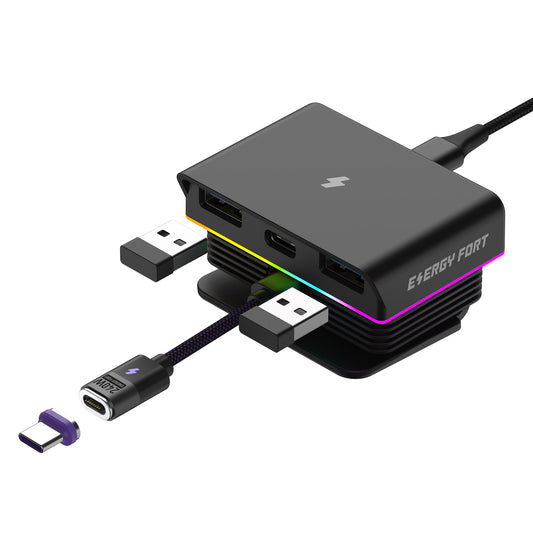
- Base de carga RGB para ratón: ideal para modelos seleccionados de Logitech G Pro X Superlight, G502, G703, G903 y modelos Razer compatibles como el Viper Ultimate. Incluye iluminación RGB, dos puertos USB 2.0 y espacio de almacenamiento para el receptor.
- Base de carga magnética para ratón: ideal para ratones Logitech y Razer seleccionados con puerto USB-C o Micro USB, incluyendo el G Pro X Superlight, MX Master 3S, Razer Viper V3 Pro y Viper V4 Pro. Elija la versión con punta magnética que coincida con el puerto de carga de su ratón.
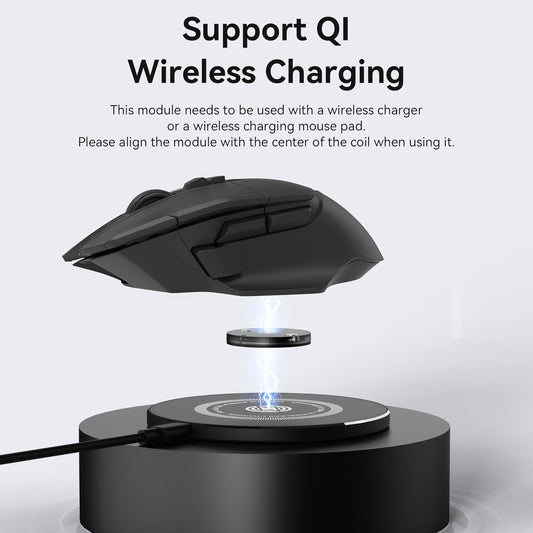
- Kit de carga inalámbrica Qi para ratón: ideal para modelos Logitech seleccionados, incluyendo G Pro X Superlight 2, G502, G703 y G903. Sustituye el módulo inferior compatible para que el ratón pueda cargarse en la base Qi incluida.
Novedad: Compatibilidad con Logitech G PRO X3 SUPERSTRIKE
EnergyFort ha verificado el Logitech G PRO X3 SUPERSTRIKE con las tres soluciones de carga de esta colección: la base de carga RGB, la base de carga magnética y el kit de carga inalámbrica Qi. Para la base magnética, elija la versión con punta magnética USB-C, ya que el X3 se carga a través de USB-C.
Compruebe la compatibilidad antes de comprar
Los sistemas de carga para ratones son específicos de cada modelo. Antes de realizar el pedido, confirme el modelo exacto de su ratón, el tipo de puerto de carga y el método de carga en la página del producto. Si no está seguro, utilice la Guía de bases de carga para ratones Logitech o la Guía de bases de carga para ratones Razer.
Explore los productos a continuación para encontrar la configuración de carga que mejor se adapte a su ratón y escritorio.

Mouse Charging Solutions
Find the Right Mouse Charging Solution
Not every wireless mouse charges the same way. Some users prefer an upright mouse charging dock for desktop storage and RGB lighting, while others need a magnetic charging dock for easier daily charging or a Qi wireless charging module for selected Logitech gaming mice.
EnergyFort offers different mouse charging solutions for compatible Logitech and Razer wireless mice, helping users reduce cable clutter, keep receivers organized, and keep their gaming or work setup ready for daily use.
Before choosing a product, please confirm your exact mouse model, charging port type, charging contact position, and whether your mouse is listed as compatible on the product page.
Check whether your Logitech or Razer wireless mouse is listed as compatible.
Select upright dock, magnetic dock, or Qi wireless charging module.
Pick the solution that best fits your gaming desk, work desk, or daily use.
Tres formas de cargar tu ratón inalámbrico
-

Base de carga para ratón
Más informaciónMantenga su ratón en posición vertical mientras se carga.
Iluminación RGB
Almacenamiento para el receptor
Concentrador USB dual
Ideal para escritorios de juegos -

Base de carga magnética
Más informaciónCarga magnética de conexión rápida.
USB-C / Micro USB
Menor desgaste del puerto
Configuración de escritorio compacta
Carga diaria rápida -

Módulo de carga inalámbrica
Más informaciónCarga inalámbrica Qi.
Sin tener que conectar cables a diario
Diseñado para ratones gaming de Logitech
Escritorio más ordenado
Configuración de carga minimalista


Ratones para juegos Logitech compatibles
• G PRO X Superlight
• G PRO X Superlight 2
• G PRO X Superlight 2C
• G PRO X Superlight 2 DEX
• G PRO Wireless
• G PRO 2 Lightspeed
• G502 Lightspeed
• G502 X Lightspeed
• G502 X Wireless
• G502 X Plus
• G703
• G903
Ratones gaming Razer compatibles
• Basilisk Ultimate
• Viper Ultimate
• Viper V3 Pro
• DeathAdder V2 Pro
• Naga Pro
¿Qué solución de carga debería elegir?
Base de carga para ratón
✔ Configuración gaming RGB
✔ Hub USB integrado
✔ Almacenamiento para receptor
Base de carga magnética
✔ Carga diaria rápida
✔ Menor desgaste del puerto
✔ USB-C / Micro USB
Módulo de carga inalámbrica ideal para:
✔ Carga inalámbrica Qi
✔ Ratones Logitech compatibles
✔ Configuración de escritorio minimalista
Antes de Comprar
Antes de realizar su pedido,
por favor verifique:
✔ Modelo del ratón
✔ Interfaz de carga
✔ Contactos de carga
✔ Compatibilidad del producto
✔ Versión del producto
¿Por qué elegir la carga para ratón EnergyFort?
BUYING QUESTIONS
Frequently Asked Questions
Do these charging docks work with all wireless mice?
No. EnergyFort mouse charging products are not universal. Please check your mouse model and charging method before ordering.
Which product should I choose?
Choose the Mouse Charging Dock for selected Logitech and Razer mice with bottom charging contacts.
Choose the Magnetic Charging Dock if your mouse uses a USB-C or Micro USB charging port.
Choose the Wireless Charging Module only for compatible Logitech mice that support Qi wireless charging after replacing the bottom module cover.
Can I use it while gaming?
The dock is mainly designed for charging between gaming or work sessions. Place the mouse on the dock when charging is needed.
What should I check before ordering?
Please confirm your exact mouse model, charging port type, charging contact position, and the compatible model list on the product page.
Does the wireless charging module support Logitech POWERPLAY?
No. The EnergyFort wireless charging module works with standard Qi wireless charging pads. It does not support Logitech POWERPLAY.
ENERGYFORT GUIDE
Learn More About Mouse Charging
Not sure which charging solution is right for your mouse?
The complete guide explains the difference between contact charging, magnetic dock charging, and Qi wireless charging module replacement.